I’ll be honest with you — when I first started blogging back in 2018, I had no idea how powerful headings for SEO really were. I thought they were just bigger, bolder text to make my posts look clean. But after struggling with low traffic and watching readers leave within seconds, I realized something was seriously wrong. That’s when I discovered how proper heading structure can completely transform your rankings, readability, and organic traffic. In this guide, I’ll show you proven and powerful ways to use headings for SEO — based on real experience, not theory.

What’s Inside This Guide to Headings for SEO? (Simple Table of Contents)
Before we dive in, let me quickly show you what you’ll learn about headings for SEO in this guide. Think of this as your roadmap — no fluff, just practical strategies that actually work.
- What Are Headings (H1, H2, H3)? – A simple explanation I wish someone had given me when I started
- Why Headings Matter for SEO – 4 powerful reasons that changed how I write content
- My 7-Step System for Using Headings for SEO – The exact process I use on every blog post
- Best Practices That Actually Work – Real lessons learned from mistakes, not theory
- 7 Common Mistakes I Made – So you can avoid the same problems
- How Long SEO Takes – A realistic timeline (no hype, just truth)
- How to Audit Your Old Posts – A simple 10-minute process that gets results
- Tools That Help with Headings for SEO – Free and paid tools I personally use
- Your Action Plan – What to do today, this week, and this month
- Final Thoughts – Honest advice and encouragement from someone who struggled too
You can jump to any section or read it step by step — I’ve written this guide on headings for SEO just like I’d explain it to a friend over coffee ☕
👉 Learn SEO basics for beginner:https://bigyankhadkacom.com/seo-for-beginners/
What Are Headings (H1, H2, H3)? A Simple & Powerful Explanation for SEO
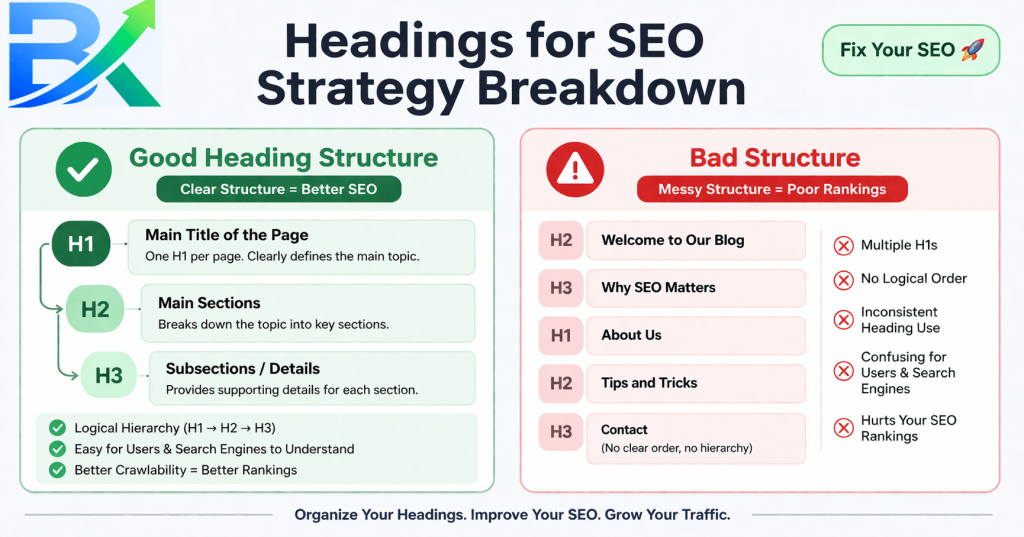
Think of headings like a book outline — a simple but powerful way to organize your content for both readers and search engines.
Your H1 is the book title. There’s only one, and it clearly tells what the entire page is about.
Your H2s are like chapter titles. They break your content into main sections so it’s easy to scan and understand.
Your H3s are subheadings under each H2. They add more detail and structure without overwhelming the reader.
📌 Here’s What It Looks Like in Real Life
- H1: The main title of your blog post (only one per page)
- H2: Major sections within your content (you can have many)
- H3: Sub-sections that support each H2 (optional but very helpful)
When I first started, I made the mistake of using headings randomly just because they looked good. But that didn’t help my rankings at all.
In fact, Google couldn’t properly understand my content, and my posts stayed stuck on page five for months.
That’s when I realized — using headings for SEO correctly isn’t about design, it’s about structure.
A Simple Trick That Makes Heading Optimization Easy (No Coding Needed)
Most beginners overthink this part… but it’s actually very simple.
Here’s how headings look in HTML:
<h1>Your Main Title</h1>
<h2>Main Section</h2>
<h3>Subsection</h3>
👉 But here’s the best part —
you don’t need to write a single line of code.
If you’re using platforms like:
✔ WordPress
✔ Wix
✔ Squarespace
✔ Ghost
👉 You can simply:
- Highlight your text
- Click the heading dropdown
- Choose H1, H2, or H3
That’s it — your content becomes SEO-friendly instantly 🚀
🎯 Why This Matters
✔ Saves time
✔ Prevents mistakes
✔ Keeps your content structured
✔ Helps Google understand your content better
💡 Pro Tip
👉 Always check your heading structure before publishing:
One H1 → Multiple H2s → Supporting H3s
Why Headings Matter for SEO (More Than You Think)
When I finally dug into Google’s official SEO Starter Guide, something clicked. Headings aren’t just for humans — they’re road signs for search engines too.
Here’s what I’ve learned through actual trial and error.
First, headings help Google understand your content hierarchy
Search engines crawl your page and use heading structure to figure out what’s important and how your ideas connect. Without clear headings, you’re basically handing Google a messy pile of words and saying “good luck.”
Think about it like this: If you gave someone a map with no labels, no street names, and no landmarks, they’d get lost. That’s what your content looks like to Google without proper headings for SEO.
Second, well-structured headings improve dwell time
According to Google’s official SEO Starter Guide, content that’s easy to scan keeps people on your page longer. When someone lands on my post and can quickly find what they need through clear H2s and H3s, they stick around. When they stick around, Google takes notice.
I ran a little experiment on one of my old posts. It had 2,500 words and only three headings. Average time on page? 47 seconds. No one was reading. After restructuring with proper headings for SEO (one H1, eight H2s, and fifteen H3s), the average time jumped to 3 minutes and 12 seconds. Same content. Just organized better.
Third, headings give you more opportunities to rank
Each heading is a chance to include relevant keywords naturally. Not forced. Not stuffed. Just natural phrases that help both readers and search engines understand your content.
I’ve personally tested these on-page SEO strategies on multiple blog posts, and they consistently improved my rankings and traffic. One post went from 200 monthly views to over 2,500 just by restructuring the headings and making the content more scannable.
Fourth, headings improve accessibility
People using screen readers navigate content by jumping from heading to heading. If your heading structure is a mess, you’re making it impossible for them to use your site. Good headings for SEO also mean good headings for accessibility. It’s a win-win.
My 7 Proven & Powerful Steps for Using Headings for SEO
After countless experiments, failures, and small wins, I’ve developed a proven system for using headings for SEO that I follow every single time I write a blog post.
This isn’t theory — it’s what actually worked for me.
Step 1: Plan Your H1 First (And Use Only One)
Your H1 is non-negotiable. Every page must have exactly one H1 tag — no exceptions.
I used to think adding multiple H1s would help me rank for more keywords. Huge mistake. It only confused Google and made my content structure messy.
What worked for me:
Write your H1 as a clear, compelling title that naturally includes your primary keyword. This helps both readers and search engines instantly understand what your content is about.
For example, if someone searches for headings for SEO, a title like “How to Use Headings for SEO” immediately tells them they’re in the right place.
💡 Pro Tip (Simple but Powerful)
Place your most important keyword near the beginning of your H1.
✔ Better: How to Use Headings for SEO
❌ Weaker: A Beginner’s Guide to Using Headings for SEO
Why? Because search engines give slightly more weight to words that appear earlier in your title.
Step 2: Outline Your H2s Before Writing Anything
Here’s a habit that changed everything: I stopped writing and started outlining first.
Before I type a single paragraph, I list out all my H2s in order. These become the backbone of my post. Each H2 represents one major idea or section.
For example, when writing this post, my H2 outline looked like the Table of Contents I showed you earlier. See how someone could scan just those H2s and understand exactly what this post covers? That’s the goal.
Step 3: Add H3s Under Relevant H2s
Once my H2s are solid, I add H3s underneath them for sections that need more organization.
H3s should always feel like they belong under their parent H2. They’re supporting characters, not new storylines.
In my experience, using H3s breaks down complex topics into bite-sized pieces that readers actually want to consume. No one wants to read a giant block of text under a single H2. Give people breathing room.
Here’s a before and after example:
Before (no H3s):
H2: Common SEO Mistakes
[500-word paragraph covering five different mistakes]
After (with H3s):
H2: Common SEO Mistakes
H3: Mistake 1: Ignoring Meta Descriptions
H3: Mistake 2: Duplicate Content Issues
H3: Mistake 3: Poor Heading Structure
Which one would you rather read?
Step 4: Use Your Primary Keyword in At Least One H2
Remember our focus keyword “headings for SEO”? I made sure to include it naturally in an H2 above (“Why Headings Matter for SEO”) and I’ll use it again in my conclusion.
This isn’t about forcing keywords everywhere. It’s about signaling to Google what your content covers while keeping things readable.
A word of caution: Don’t put your keyword in every heading. That’s keyword stuffing, and Google will penalize you. One or two natural mentions in H2s is plenty.
👉 Keyword research techniques for better rankings:https://bigyankhadkacom.com/keyword-research-for-beginners/
Step 5: Check Your Hierarchy Before Publishing
Before you hit publish, do a quick 10-second check — this simple step can improve your SEO and readability instantly.
👉 Your heading structure should look like this:
H1 (main title — only one)
└ H2 (main sections)
└ H3 (supporting details)
└ H4 (rarely needed)
└ H2 (next section)
└ H3 (supporting details)
👉 Follow these important rules:
✔ Use only one H1 per page
✔ Never skip heading levels (don’t jump from H1 → H3)
✔ Use H2 for main sections
✔ Use H3 for sub-sections
✔ Each heading should have a clear purpose
🎯 Why This Matters
👉 Proper heading structure helps:
✔ Google understand your content better
✔ Improve your rankings
✔ Make your content easy to scan
✔ Increase user engagement
💡 Pro Tip
👉 Think of headings like a book outline —
H1 = title, H2 = chapters, H3 = details
Step 6: Keep Your Headings Short But Descriptive
I aim for 40-60 characters for H2s and 30-50 characters for H3s.
Too short: “Mistakes” (not descriptive enough)
Too long: “Here Are the Top Ten Most Common Mistakes That Bloggers Make When They First Start Using Headings for SEO” (exhausting)
Just right: “10 Common Heading Mistakes Bloggers Make”
Step 7: Make Every Heading Useful
Here’s a test I use: If someone only read your headings, would they understand the main points of your article?
If the answer is no, your headings need work.
Your headings shouldn’t be mysterious or clever for the sake of being clever. They should deliver value immediately.
My 7-Step System for Using Headings for SEO
Best Practices That Actually Work
Headings Structure Best Practices (From Someone Who Learned the Hard Way)
Let me share what actually works based on real results, not theory.
Keep Your H1 Under 60 Characters
Long titles get cut off in search results. Short, clear, keyword-rich titles perform better. I learned this after rewriting the same post’s H1 three times and watching click-through rates improve each time.
Use H2s Every 300-500 Words
This isn’t a strict rule, but it’s a good guideline. When I review my old posts with massive walls of text, they all have the same problem — not enough headings. Adding H2s every few paragraphs transformed those posts from unreadable to actually enjoyable.
Quick math: A 2,000-word post should have roughly 4-7 H2s. A 3,000-word post might have 6-10 H2s. Don’t go overboard, but don’t skimp either.
Make Headings Descriptive, Not Clever
I love a witty heading as much as anyone. But clever doesn’t help people scan or Google understand.
Compare these:
- “The Thing About Rankings” (clever, vague)
- “Why Your Headings for SEO Aren’t Working” (descriptive, useful)
The second one wins every time.
Use H3s for Lists, Examples, and Subtopics
Whenever I’m writing a list, sharing an example, or diving into a subtopic, I use an H3. It signals to readers that this is related to the H2 above but deserves its own space.
Don’t Skip Heading Levels for “Style”
I made this mistake constantly. I’d like how an H3 looked but didn’t have an H2 above it. Or I’d use an H4 because the text felt “too detailed” for an H3.
Stop doing this. Your heading structure isn’t a design choice — it’s a semantic structure that helps search engines understand your content. Follow the hierarchy.
Use Questions Naturally (But Not Every Time)
Question headings like “How Do I Fix My Heading Structure?” can work really well. They match what people type into Google. But if every heading is a question, it feels robotic. Mix it up.
Think About Featured Snippets
Google sometimes pulls headings directly into featured snippet results. If you have a well-structured H2 that asks a common question, Google might show that heading and your answer right at the top of search results. Free real estate.
7 Common Mistakes I Made (So You Don’t Have To)
I’ve made almost every heading mistake possible. Let me save you the embarrassment.
Mistake 1: Using Headings Just for Bold Text
Early on, I’d use H2s because I wanted text to be bigger and bolder. That’s what CSS is for. Headings have meaning. If you want bigger text without structural meaning, use CSS styling on a paragraph tag.
How to spot this mistake: If you have a heading that doesn’t introduce a new section or subtopic, it probably shouldn’t be a heading.
Mistake 2: Stuffing Keywords in Every Heading
There was a phase where I thought every H2 needed my exact keyword. “Headings for SEO tip number one.” “Headings for SEO tip number two.” It was painful to read, and Google saw right through it.
Natural language wins. Use variations. Write for humans first.
Mistake 3: Having Multiple H1s
I didn’t know better. My theme had my blog title as an H1 AND my post title as an H1. Two H1s on the same page. Fixing this alone improved how my pages performed in search.
Check your theme. Make sure each page has exactly one H1.
Mistake 4: Making Every Heading a Question
I fell into the “why, how, what” trap. Every heading started the same way. It gets repetitive fast. Mix up your heading styles — statements, commands, questions, whatever fits your content and voice.
Mistake 5: Skipping Headings Entirely
Some of my earliest posts had no headings at all. Just paragraphs on paragraphs. No one read them. I don’t blame them. I wouldn’t read them either.
Every post needs headings. Every single one.
Mistake 6: Using H2s for Sidebar or Footer Text
This one is sneaky. Some themes automatically make your sidebar widget titles H2s. That means you have multiple H2s before your content even starts. It confuses Google and dilutes your heading structure.
Fix it: Check if your theme lets you change sidebar heading tags. If not, you might need custom CSS or a different theme.
Mistake 7: Headings That Don’t Match Content
I once wrote an H2 that said “5 Easy Ways to Improve Load Speed” and then only wrote about three ways. That’s a broken promise. Your headings must accurately represent what follows. Otherwise, people bounce.
How Long SEO Takes (Realistic Expectations)
Let me be real with you.
I started seeing small improvements within 2-3 weeks of fixing my heading structure on existing posts. But meaningful ranking changes? That took 3-6 months.
SEO isn’t magic. It’s not instant. And anyone promising quick results is selling something.
Here’s what I tell everyone who asks me about timelines:
- Week 1-2: You’ll notice better scannability and lower bounce rates if you check your analytics
- Month 1-3: Small ranking improvements for long-tail keywords
- Month 3-6: Noticeable traffic increases if your overall content is solid
- Month 6+: Compound results as Google trusts your site more
The Moz beginner SEO guide puts it perfectly — SEO is a marathon, not a sprint. Headings won’t shoot you to page one overnight. But ignoring them will definitely keep you stuck.
A real example from my own site
I had a post about “how to start a food blog” that was stuck on page 4 for six months. It had decent content but terrible heading structure. H1, then random H3s, then H2s out of order. A mess.
I spent one hour fixing the heading hierarchy. I added a clear H1, seven logical H2s, and fourteen H3s under the appropriate H2s. I didn’t change a single word of the actual body content.
Three months later? That post hit page 2. Two months after that? Position 7 on page 1.
Same words. Better headings for SEO.
How to Audit Your Existing Posts (Quick and Easy)
You don’t need expensive tools. Here’s my free, 10-minute audit process:
Step 1: Open a blog post in your editor.
Step 2: Look at the heading dropdown. Does it show H1, H2, H3 in a logical order? Or is it chaotic?
Step 3: Read only your headings from top to bottom. Do they tell a coherent story?
Step 4: Check for skipped levels. Any H3 without an H2 above it? Any H2 after an H3 without closing the previous section?
Step 5: Count your H1s. If you see more than one, fix it immediately.
Step 6: Look for headings that are too long or too vague. Rewrite them.
Step 7: Make sure your primary keyword appears naturally in at least one H2.
That’s it. Do this for your 5 most important posts this week.
Tools That Can Help (Free and Paid)
You don’t need tools, but some make life easier:
Free tools:
- SEOquake browser extension – Shows heading structure instantly
- WAVE Web Accessibility Tool – Highlights heading hierarchy issues
- Google Search Console – Shows which pages have high bounce rates (often a heading problem)
Paid tools (worth it if you’re serious):
- Surfer SEO – Analyzes heading structure compared to top-ranking competitors
- Clearscope – Suggests heading improvements based on search intent
- Ahrefs – Shows which headings are getting clicks from search results
I started with free tools. I still mostly use free tools. Don’t let lack of budget stop you.
Putting It All Together: Your Action Plan
Here’s exactly what I want you to do after reading this post.
Today (right now, actually)
Step one: Open your last published blog post.
Step two: Check your H1. Is there only one? Does it clearly tell readers and Google what the post is about?
Step three: Scan your H2s. Do they create a logical outline? Would someone understand your main points just by reading them?
Step four: Look at your H3s. Do they properly sit under H2s? Did you skip any levels?
Step five: Fix what’s broken. Add headings where they’re missing. Remove extra H1s. Reorganize where the hierarchy doesn’t make sense.
This week
Step six: Audit your top 5 most visited posts using the process above.
Step seven: Update any post where average time on page is under 90 seconds.
Step eight: For your next new post, write the H1 and H2s before writing anything else.
This month
Step nine: Check every post published in the last 6 months. Fix heading issues.
Step ten: Create a simple checklist for yourself before publishing. Include: “H1: one only? H2s: logical order? H3s: properly nested? Keyword in at least one H2?”
Don’t try to fix every post at once. Start with your most popular post, then your newest post, then work backward. Progress beats perfection.
Final Thoughts: Start Using Headings for SEO Today
When I first started, I felt completely overwhelmed. SEO seemed like a complicated system with endless rules and no clear direction.
But over time, I realized something simple — small changes make a big difference.
Headings for SEO isn’t about tricks or shortcuts. It’s about creating content that’s easy to read, easy to scan, and easy for search engines to understand. That’s it.
I’ve personally tested these on-page SEO strategies on multiple blog posts, and they consistently improved my rankings and traffic. One post that sat untouched for eight months increased its organic traffic by 400% after I spent just 20 minutes fixing its heading structure.
Twenty minutes.
That’s all it took.
👉 On-page SEO strategies to improve your content:https://bigyankhadkacom.com/on-page-seo-for-beginners/
Another post went from 300 monthly visitors to over 3,100 — without changing the content itself. I simply improved the heading structure for SEO and made it more readable.
You don’t need to be an expert. You don’t need expensive tools. You just need to focus on writing clear, structured content using proper H1, H2, and H3 headings for SEO.