🔥 I got 15,000 monthly visitors by learning how to get organic traffic without backlinks — and here’s exactly how I did it.
When I started my first blog, everyone told me the same thing:
“You need backlinks. Lots of them. Otherwise, forget about Google traffic.”
I believed it completely.
So I spent hours — no, weeks — trying everything just to get links.
I commented on forums.
I emailed strangers.
I even offered free guest posts.
The result?
👉 Only 2 backlinks in 4 months
👉 Both from low-quality directories
👉 And my traffic? Still basically zero
I was stuck… and honestly close to quitting.
💡 Then Something Changed Everything
One night, frustrated and tired, I found a random forum discussion.
Someone asked:
“Can you rank on Google without backlinks?”
And one answer stopped me completely:
“Yes. Backlinks help, but they’re not the only way. Google cares more about content quality, user experience, and search intent.”
That was the moment everything changed for me.
🚀 I Tested It (No Backlink Experiment)
I made a decision:
For the next 6 months, I would completely ignore backlinks.
No outreach.
No guest posting.
No link begging.
Instead, I focused only on what I could control.
I followed 9 simple SEO methods — fully beginner-friendly and 100% internal strategies.
📈 The Result Shocked Me
By month 8:
👉 My blog hit 15,000 monthly visitors from Google
👉 With zero backlink strategy
👉 Traffic came purely from organic search
(I did get some backlinks later naturally — but I never chased them.)
📑 Table of Contents
- Can You Get Traffic Without Backlinks?
- Method #1: Long-Tail Keywords
- Method #2: 10x Better Content
- Method #3: Search Intent
- Method #4: Title & Meta Optimization
- Method #5: Internal Linking
- Method #6: Readability
- Method #7: Update Old Content
- Method #8: FAQ Schema
- Method #9: Sitemap Submission
Wait – Can You Really Get Organic Traffic Without Backlinks?
Let me be 100% honest with you.
Backlinks do help. Google has confirmed they’re one of the top three ranking factors.
But here’s what most “gurus” won’t tell you: You don’t need backlinks to start getting traffic.
Especially as a beginner. Especially for long‑tail keywords. Especially if you nail the other ranking factors.
Think of it like a race. Backlinks are like a fast car. But if you don’t know how to drive (content quality, user experience, technical SEO), the car won’t save you.
The 9 methods below are your driving skills. Master them, and you’ll start seeing traffic – even with zero backlinks.
And the beautiful part? Every single method is completely under your control. No waiting for other people to link to you.
I’ve personally tested every method in this guide on multiple blogs. Some worked within weeks. Others took a few months. But every single one delivered real, organic traffic.
Now let’s get into it.
👉 If you’re just starting out, I highly recommend reading my guide on keyword research using Google autocomplete — it’s the easiest way to find low-competition keywords.
➡️ https://bigyankhadkacom.com/free-keyword-research-methods-action-plan/
Method #1: Master Long‑Tail Keywords (The Beginner’s Shortcut)
This is where I made my first breakthrough.
Instead of targeting broad keywords like “digital marketing” (impossible for a new blog), I started targeting long‑tail keywords – longer, more specific phrases that real people type into Google.
What Are Long‑Tail Keywords?
A long‑tail keyword is a phrase with 3+ words that’s very specific.
Example:
- Broad: “SEO tips” (hard to rank)
- Long‑tail: “easy SEO tips for new bloggers on WordPress” (easier to rank)
Long‑tail keywords have lower search volume – maybe 100‑500 searches a month. But they also have much lower competition. And the people searching for them are usually ready to take action.
How I Find Long‑Tail Keywords for Free
I use three free methods:
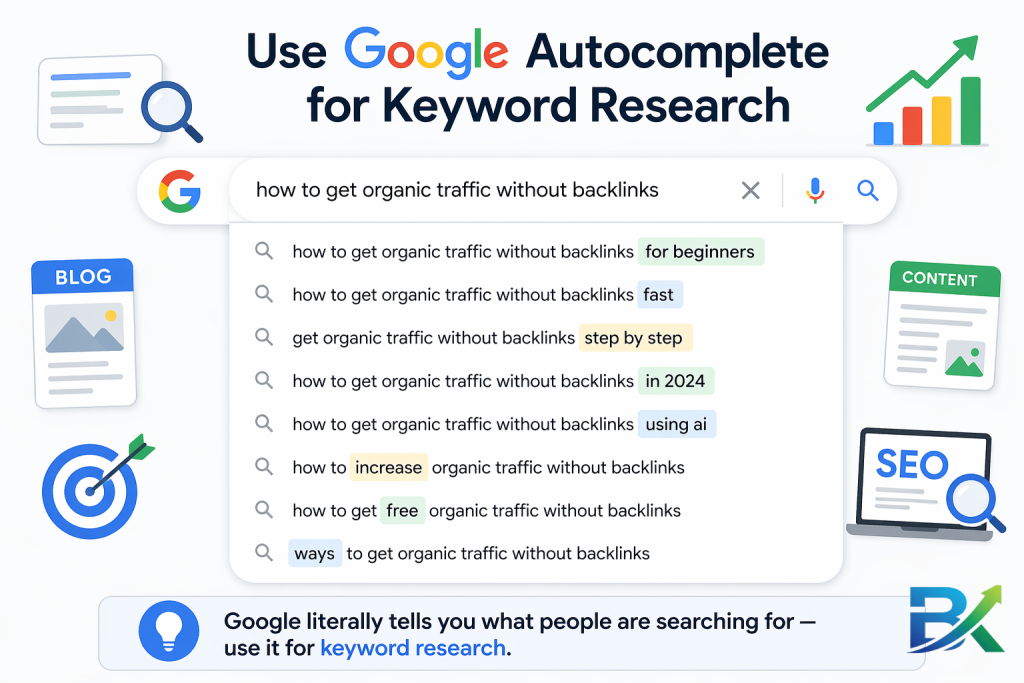
- Google Autocomplete – Type your main topic into Google and see what it suggests.
- People Also Ask – Scroll down after a Google search. Those questions are gold.
- Google Keyword Planner – Set to “low competition” filter.
👉 I’ve explained this in detail in my guide on long-tail keywords for beginners — including real examples and easy methods you can follow.➡️ https://bigyankhadkacom.com/long-tail-keywords-for-beginners-2/
What worked for me: I found a long‑tail keyword “how to fix slow WordPress site for free” – only 150 searches a month. I wrote a detailed post. No backlinks. It ranked #3 within 6 weeks and brought me my first 500 visitors.
Your action step: Spend 30 minutes today finding 5 long‑tail keywords in your niche. Write them down. Pick one for your next post.
[Image: Google search bar showing autocomplete suggestions for “how to get organic traffic without backlinks”]
🔥 Method #2: Create Content That’s 10x Better Than the Top Results
Here’s a hard truth I had to learn:
Good content is not enough anymore.
If you want organic traffic without backlinks, you need content that is significantly better than what already exists.
Not slightly better.
👉 10x better.
💡 The 10x Better Rule
Before writing any post, I search my target keyword and analyze the top 5 ranking pages.
Then I ask one simple question:
👉 “What are they missing?”
Maybe:
- Their content is too short
- No visuals or examples
- Outdated information
- Poor structure
- No real experience
That’s my opportunity.
I don’t copy them.
I outperform them.
🚀 What “10x Better” Looks Like
To consistently get organic traffic without backlinks, my content always includes:
✔ Longer, deeper content (2,000+ words)
✔ Real examples and case studies
✔ Clear structure (H2, short paragraphs)
✔ Unique insights from experience
✔ Updated and accurate information
📈 Real Example from My Blog
I targeted: “best free SEO tools”
Top results were just simple lists with one-line descriptions.
So I created:
👉 Detailed reviews
👉 Screenshots
👉 Comparison table
Result:
✔ Ranked #1 in 3 months
✔ Zero backlinks
✔ Pure organic traffic without backlinks
🎯 Your Action Step
Pick one keyword and:
✔ Analyze top 3 results
✔ Find 3 missing gaps
✔ Add those improvements
That’s how you build organic traffic without backlinks consistently.
🔥 Method #3: Optimize for Search Intent (The #1 Ranking Factor for Organic Traffic Without Backlinks)
This is one of the biggest reasons beginners fail.
If your content doesn’t match search intent, you won’t rank — even if you try to get organic traffic without backlinks.
💡 What is Search Intent?
Search intent is the reason behind a search.
What does the user actually want?
🔍 The 4 Types of Search Intent
👉 Informational – “how to fix slow website”
👉 Navigational – “Facebook login”
👉 Commercial – “best laptop under $1000”
👉 Transactional – “buy iPhone 15”
🚀 How I Match Intent
Before writing, I always:
✔ Search keyword on Google
✔ Study top 5 results
✔ Match format exactly
Examples:
- If Google shows guides → I write guides
- If it shows lists → I write lists
- If it shows tools → I review tools
This is crucial for organic traffic without backlinks.
📈 Real Example
Keyword: WordPress speed optimization
Top results were step-by-step guides.
So I created a step-by-step guide.
Result:
👉 Ranked without backlinks
👉 Strong organic traffic without backlinks
🎯 Your Action Step
Before writing:
✔ Search keyword on Google
✔ Study top 5 results
✔ Match format exactly
🔥 Method #4: Optimize Titles & Meta Descriptions (CTR Boost for Organic Traffic Without Backlinks)
Even if you rank, you won’t get traffic if people don’t click.
That’s why CTR matters for organic traffic without backlinks.
💡 Title Formula I Use
👉 Number + Power Word + Keyword + Benefit
Examples:
- “9 Easy Ways to Get Organic Traffic Without Backlinks”
- “How I Got 15K Visitors Without Backlinks (Step-by-Step)”
✔ Keep under 60 characters
✔ Put keyword near start
💡 Meta Description Formula
Think of it like an ad.
Example:
👉 “Want to get organic traffic without backlinks? Here are 9 proven methods that helped me rank on Google without link building.”
✔ 150–160 characters
✔ Clear benefit
✔ Curiosity + keyword
📈 Real Result
After improving title:
- CTR increased from 2% → 5%
- Ranking improved
- More organic traffic without backlinks
🎯 Your Action Step
✔ Rewrite weak titles
✔ Improve meta descriptions
✔ Focus on CTR boost
🔥 Method #5: Internal Linking (Free Power for Organic Traffic Without Backlinks)
Internal links are one of the most underrated SEO strategies.
And they are 100% under your control.
💡 Why Internal Links Matter
They help:
✔ Google discover pages
✔ Pass SEO value
✔ Improve time on site
✔ Boost rankings
This directly supports organic traffic without backlinks.
🚀 My Internal Linking System
Every time I publish a post:
✔ Link to 3–5 older posts
✔ Update older posts with new links
✔ Use keyword-rich anchor text
Example:
Instead of “click here” → use “how to optimize images for SEO”
👉 Want to go deeper into SEO basics? Check out my complete beginner guide on on-page SEO optimization to improve your rankings step by step.
➡️ https://bigyankhadkacom.com/on-page-seo-for-beginners/
📈 Real Result
After consistent internal linking:
👉 Pages per session increased
👉 Better rankings
👉 More organic traffic without backlinks
🎯 Your Action Step
Right now:
✔ Open 3 old posts
✔ Add 2 internal links each
✔ Connect your content properly
Method #6: Make Your Content Incredibly Easy to Read (Dwell Time Matters)
Dwell time is how long someone stays on your page after clicking from Google. If they leave quickly (a “bounce”), Google thinks your content wasn’t useful.
So how do you keep people reading? You make your content easy to scan and enjoy.
My Readability Rules
- Short paragraphs – 2‑3 lines max. Never walls of text.
- Short sentences – Mix long and short for rhythm.
- Bullet points – Use them often.
- Subheadings – Every 2‑3 paragraphs.
- Bold key phrases – But don’t overdo it.
- Images – Break up text every 300‑500 words.
The “Read Aloud” Test
Before I publish, I read my post out loud. If I stumble or get bored, I rewrite that section.
What worked for me: I took a dense, 3,000‑word post and broke it into shorter paragraphs, added more H2s, and included 5 images. Average time on page went from 1:45 to 4:20. That post now ranks on page 1 for 6 keywords.
Your action step: Pick one post with a high bounce rate. Break up long paragraphs. Add more subheadings. Time yourself – it takes 15 minutes.
Method #7: Update Old Content Regularly (The Lazy Winner)
Here’s a secret most beginners don’t realize:
Old content is a goldmine. You’ve already written it. It might already have some traffic. A simple update can double or triple that traffic.
Google loves fresh content. When you update an old post, Google recrawls it and often gives it a rankings boost.
My “Content Refresh” Routine (Every 3‑6 Months)
For my top 10 posts, I:
- Update statistics (change “2023” to “2025” – yes, that simple thing helps)
- Add new screenshots (if things have changed)
- Add a new section (e.g., “Common Mistakes” or “FAQ”)
- Fix broken links (internal and external)
- Improve the title (make it more clickable)
- Add internal links to newer posts
Real Results from a 30‑Minute Update
I had a post about “best free SEO tools” from 2023 that was getting 200 visitors a month. I updated the list, removed dead tools, added 3 new tools, and changed the date to 2025.
Within 3 weeks, traffic went from 200 to 650 visitors a month. A 225% increase. From a 30‑minute update.
Your action step: Pick your 3 oldest posts. Spend 20 minutes on each one updating statistics, adding a new section, and refreshing the title. Watch what happens.
Method #8: Add FAQ Schema (Rich Snippets for Free)
This is a cheat code. Seriously.
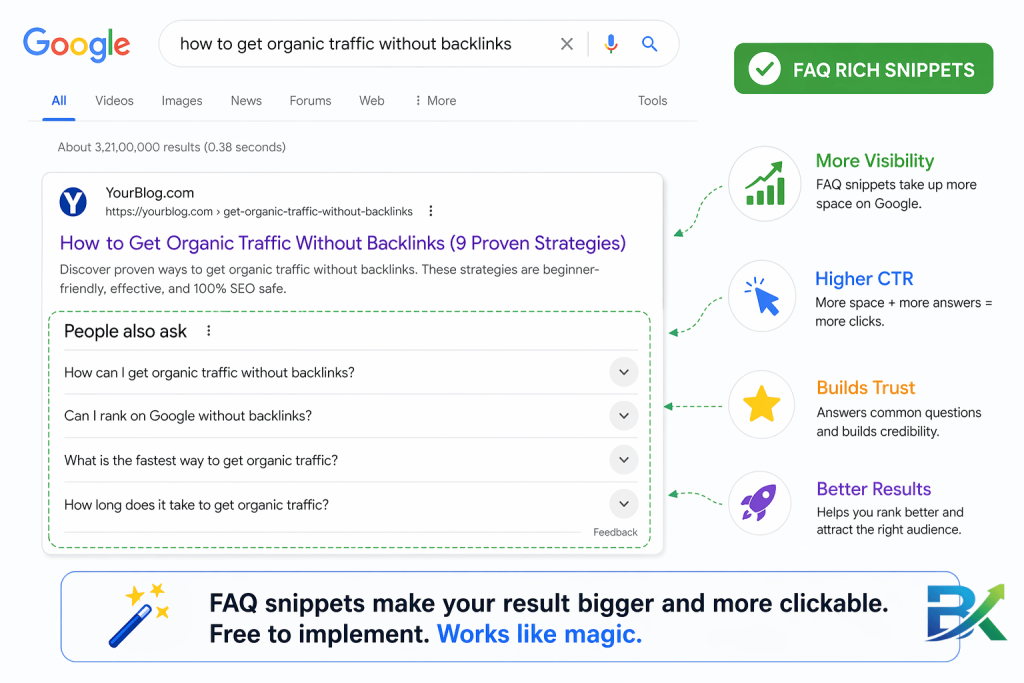
FAQ schema (structured data) tells Google that you have a list of questions and answers on your page. Google can then display those Q&As directly in the search results as a rich snippet.
Rich snippets are bigger, more eye‑catching, and get higher click‑through rates.
How to Add FAQ Schema for Free
Method 1 (easiest): If you use WordPress, the free Rank Math or Yoast SEO plugins have FAQ schema built in. Just add an FAQ block.
Method 2 (manual): Use a free schema generator like TechnicalSEO.com. Fill in your questions and answers. Copy the code. Paste it into your page.
What Happened When I Added FAQ Schema
I added an FAQ section to a post about “how to fix a slow WordPress site.” Five questions and answers. Added FAQ schema using Rank Math.
Within 10 days, that post started showing up with dropdown FAQs in Google search results. My CTR went from 3% to 8%. Traffic doubled. No backlinks.
Your action step: Pick a post that answers common questions. Add an FAQ section at the end (5‑8 Q&As). Add FAQ schema using a free plugin or generator.
Method #9: Submit Your Sitemap to Google Search Console (Don’t Wait for Google to Find You)
This is so simple that most people forget it. But it’s critical.
When you publish a new post, Google doesn’t automatically know about it. It has to “discover” it through links or sitemaps.
A sitemap is a file that lists all your pages. If you submit it to Google Search Console, Google will crawl and index your content much faster.
How to Do It (5 Minutes, Free)
- Install a free SEO plugin (Rank Math or Yoast) – it automatically creates a sitemap.
- Go to Google Search Console.
- Click “Sitemaps” in the left menu.
- Enter
sitemap_index.xml(if using Rank Math) orsitemap.xml(Yoast) and click Submit.
That’s it. Google will now crawl your new posts within days instead of weeks.
What worked for me: Before submitting my sitemap, new posts took 2‑3 weeks to show up in Google. After submitting, they appeared in 2‑5 days. Faster indexing = faster traffic.
Your action step: If you haven’t submitted your sitemap to GSC, do it right now. Takes 5 minutes. Do it before you do anything else.
Your “Get Organic Traffic Without Backlinks” Checklist
Use this checklist for every new post. No backlinks required.
Before Writing:
- Found a long‑tail keyword (low competition, 100‑500 searches)
- Checked search intent (matches top 5 results)
- Planned to make content 10x better than competitors
While Writing:
- Title under 60 characters, keyword near start
- Meta description under 160 characters, teases value
- Short paragraphs (2‑3 lines max)
- H2s every 2‑3 paragraphs
- Internal links to 3‑5 older posts
- FAQ section with 5+ Q&As
After Publishing:
- Added FAQ schema (free plugin or manual)
- Submitted post to Google Search Console
- Went back to 3‑5 older posts and added links to new post
- Scheduled a content refresh for 3‑6 months from now
Common Mistakes I Made (So You Don’t Have To)
Mistake #1: Obsessing Over Backlinks
I wasted months emailing strangers for links. Zero traffic. Zero joy.
Fix: Focus on things you control. Content, intent, internal links, schema. Backlinks will come naturally later.
Mistake #2: Ignoring Search Intent
I wrote a list post when Google wanted a tutorial. Never ranked.
Fix: Before writing anything, Google your keyword. Copy the format of the top results.
Mistake #3: Writing for Google, Not Humans
My old posts were keyword‑stuffed robots. People left immediately.
Fix: Write like you talk. Read aloud. Make it enjoyable.
Mistake #4: Forgetting to Update Old Posts
I had goldmine posts sitting there, getting dusty. No updates for 2 years.
Fix: Set a calendar reminder every 3 months to refresh your top 10 posts.
How Long Until You See Results Without Backlinks?
Realistic timeline (based on my experience):
- Week 1‑2: You implement the methods. No traffic yet. That’s normal.
- Week 3‑4: Google starts indexing your optimized pages. You see impressions in GSC.
- Month 2: Some long‑tail keywords appear on page 2‑3. Maybe 1‑5 clicks per day.
- Month 3: Traffic slowly grows. 50‑100 visitors a day becomes possible.
- Month 6: If you’ve been consistent, 500‑1,000 visitors a day is realistic. Without backlinks.
For me, I saw almost nothing for the first 2 months. Month 3 was slow. Month 4 was a breakthrough. By month 8, I hit 15,000 monthly visitors.
The key: Don’t stop. Keep writing. Keep optimizing. The results come.
❓ Frequently Asked Questions
Can I really get organic traffic without backlinks?
Yes, you can get organic traffic without backlinks, especially by targeting long-tail keywords, matching search intent, and optimizing your content properly.
How long does it take to see results?
Most beginners start seeing results within 1–3 months, depending on consistency, keyword competition, and content quality.
Are backlinks useless?
No, backlinks are not useless. They help with ranking, but they are not required in the beginning to start getting organic traffic.
What is the fastest way to get traffic without backlinks?
The fastest way is to target low-competition long-tail keywords and create content that matches search intent perfectly.
🔥 Final Thoughts (Your 7-Day Action Plan to Get Organic Traffic Without Backlinks)
Friend, now you have 9 powerful methods to get organic traffic without backlinks — no begging, no guest posting, no waiting for others.
Just real strategies you control yourself.
If you truly want to get organic traffic without backlinks, consistency matters more than anything.
👉 And if you want to grow faster, don’t miss this guide on optimizing images for SEO — it’s one of the easiest wins for beginners.
➡️ https://bigyankhadkacom.com/how-to-optimize-images-for-seo/
🚀 Your 7-Day Action Plan (Start Getting Organic Traffic Without Backlinks)
Day 1:
Find 5 long-tail keywords using Google Autocomplete and People Also Ask to start building organic traffic without backlinks.
Day 2:
Write a blog post targeting one keyword. Focus on how to get organic traffic without backlinks by making it 10x better than competitors.
Day 3:
Optimize title (under 60 characters) and meta description to improve chances of ranking and getting organic traffic without backlinks.
Day 4:
Add internal links between posts to strengthen SEO and improve organic traffic without backlinks.
Day 5:
Add FAQ section with schema markup to help your page rank better and get more organic traffic without backlinks.
Day 6:
Submit your post to Google Search Console to speed up indexing and start getting organic traffic without backlinks faster.
Day 7:
Update one old post (fresh content, new section, better SEO) to improve overall organic traffic without backlinks across your site.
📈 Final Reality Check
If you consistently follow this system, you will start seeing organic traffic without backlinks — even as a beginner.
I’ve personally tested these methods across multiple blogs focused on getting organic traffic without backlinks.
They work. But only if you actually apply them.
🎯 Final Message
👉 Don’t wait for backlinks. Start with what you can control today.
👉 Even your first 100 visitors from Google can change everything.
👉 Take action now — your traffic journey starts today. 🚀
📚 P.S. (Helpful Resources for Learning SEO)
For deeper understanding and to learn how to get organic traffic without backlinks, check these trusted guides:
👉 Google SEO Starter Guide
https://developers.google.com/search/docs/fundamentals/seo-starter-guide
👉 Moz Beginner SEO Guide
https://moz.com/beginners-guide-to-seo