My 10-Step SEO Setup Guide for New Websites
If you are launching a new website, getting traffic from Google can feel slow and confusing at first.
The truth is simple: most websites don’t fail because of content — they fail because of missing SEO setup.
When I started, I made the same mistake. I focused only on writing posts, but ignored the technical foundation. As a result, my site stayed invisible for months.
This simple SEO setup guide will help you avoid that mistake and build a strong foundation from day one.
👉 Let’s go step by step.
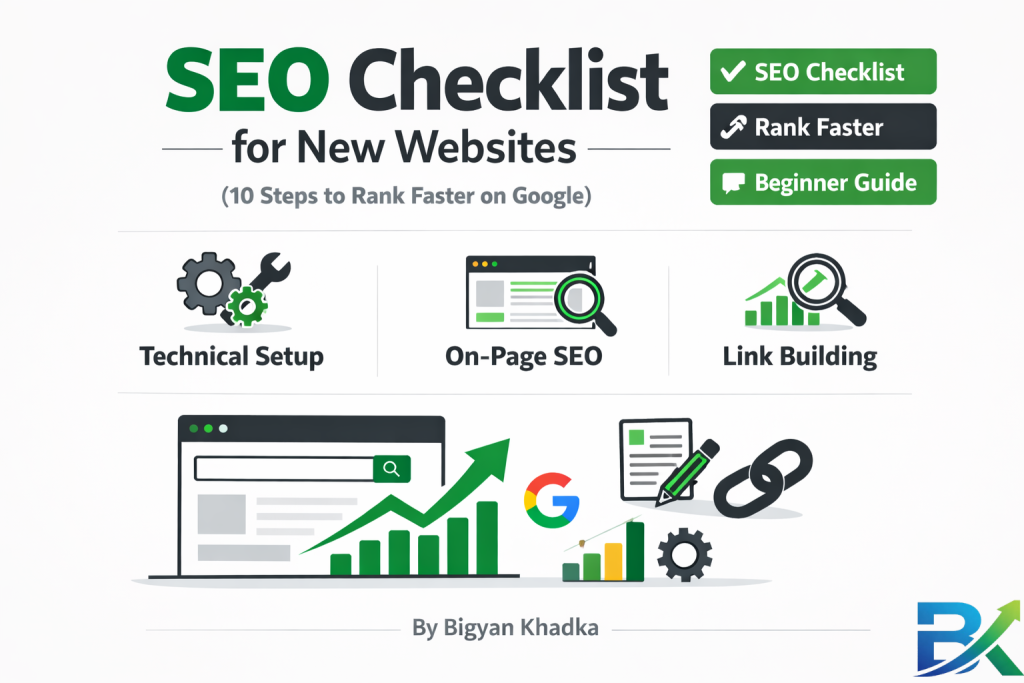
👉 SEO checklist for new websites is a step-by-step guide that helps beginners set up their website properly for Google ranking.
Start today — step by step.
And slowly, your website will start getting traffic.
🔹 Step 1: Set Up Google Search Console & Google Analytics (Day 1)
This is your starting point.
- Google Search Console helps Google find and index your website
- Google Analytics shows how users behave on your site
I delayed this step early on — and my site stayed invisible for weeks.
👉 Fix: Set up both tools on the first day of launching your website.
🔹 Step 2: Submit Your XML Sitemap
A sitemap is like a roadmap for search engines.
It helps Google understand your website structure and discover all pages.
Most platforms generate it automatically.
👉 Fix: Submit sitemap.xml in Google Search Console.
🔹 Step 3: Install an SEO Plugin (WordPress Users)
If you’re using WordPress, an SEO plugin makes optimization easier.
Popular tools:
- Rank Math (advanced but beginner-friendly)
- Yoast SEO (simple and reliable)
These tools help with:
✔ Meta titles & descriptions
✔ Sitemap creation
✔ Basic SEO structure
✔ Readability improvements
🔹 Step 4: Choose a Fast, Mobile-Friendly Theme
My first mistake was choosing a heavy theme with animations and large images.
It looked good but loaded very slowly.
👉 Fix: Use lightweight themes like Astra or GeneratePress for better speed and SEO performance.
🔹 Step 5: Optimize Your Permalink Structure
Permalinks are your URL structure.
Bad:
yourwebsite.com/?p=123
Good:
yourwebsite.com/seo-guide-beginners
👉 Fix: Go to Settings → Permalinks → Select “Post name”.
🔹 Step 6: Create Your Core Pages
Every new website needs basic trust pages:
- Homepage
- About Page
- Contact Page
- Privacy Policy
- Terms of Service
👉 These pages help build trust and improve SEO foundation.
🔹 Step 7: Do Keyword Research for Your First 10 Posts
Don’t guess keywords.
Instead:
- Use long-tail keywords
- Target low-competition topics
- Focus on search intent
Free tools:
- Google autocomplete
- Ubersuggest
- AnswerThePublic
👉 Smart keyword research is key for any beginner SEO guide.
🔹 Step 8: Write High-Quality Content (1500+ Words)
Short content rarely ranks.
Focus on:
- Full answers
- Personal experience
- Clear structure
- Helpful examples
👉 Search engines prefer detailed, useful content over thin articles.
🔹 Step 9: Add Internal Links Between Posts
Internal linking helps Google understand your site structure.
👉 Simple rule:
Add 2–5 relevant internal links in every post.
This improves SEO and keeps users longer on your site.
👉 Smart keyword planning is a key part of any beginner SEO guide.
👉 If you want to go deeper, here is a detailed guide that explains SEO basics step by step:
🔗 https://bigyankhadkacom.com/seo-for-beginners/
🔹 Step 10: Build Your First Backlinks (Ethically)
Backlinks are trust signals for Google.
Beginner methods:
- Guest posting
- Broken link building
- Helpful blog comments
- Free tools or resources
👉 Even a few quality backlinks can improve your website SEO strategy.

What Is an SEO Checklist for New Websites? (And Why You Need One)
When you launch a new website, it starts out invisible.
Google doesn’t know your site exists yet. Other websites aren’t linking to it. And visitors can’t find your content.
A SEO setup checklist for beginners is a simple step-by-step system that helps you configure everything properly so search engines can discover, understand, and rank your site.
Think of it like preparing for a journey.
If you forget your passport, you can’t travel.
If you miss important essentials, everything becomes harder later.
This checklist acts like your website foundation — it ensures your site is ready for search engines from day one.
I’ve tested these website SEO steps on multiple blogs, and they consistently improved indexing and organic traffic over time. This beginner SEO guide combines both technical setup and on-page essentials that most new website owners often ignore.
👉 Without this foundation, even good content can stay invisible for months.
Now let’s go through the 10 important steps.
🟢 Why This Checklist Matters (Real Talk)
Here’s something I learned through experience:
👉 Google doesn’t automatically rank new websites just because they exist.
Even with great content, without proper setup, your site can remain invisible for months.
This is why a new website SEO strategy is so important from day one.
It helps you focus on:
- Technical setup → so search engines can properly crawl your pages
- On-page optimization → so Google understands your content clearly
- Content quality → so users stay longer and engage more
- User experience → so visitors trust your website
- Authority signals → so your site gradually builds credibility
Many beginners skip the technical SEO foundation and jump straight into writing. I did the same — and lost months of potential traffic.
👉 Don’t repeat that mistake. Follow each step carefully and build your SEO foundation the right way.
🟢 My 10-Step Website SEO Setup Guide (Follow in Order)
Let’s break it down simply.
🔹 Step 1: Set Up Google Search Console & Google Analytics (Day 1)
This is your starting point in any beginner SEO guide.
- Google Search Console helps search engines discover and index your site
- Google Analytics helps you understand visitor behavior and traffic sources
I delayed this step early on — and my site stayed invisible for weeks.
👉 Fix: Set up both tools on day one of launching your website.
🔹 Step 2: Submit Your XML Sitemap
A sitemap is like a roadmap for search engines.
It lists all your important pages in one place and helps Google crawl your site efficiently.
Most website platforms generate it automatically.
👉 Fix: Submit sitemap.xml inside Google Search Console as part of your SEO setup checklist.
🔹 Step 3: Install an SEO Plugin (WordPress Users Only)
If you’re using WordPress, an SEO plugin simplifies everything.
Popular options:
- Rank Math (advanced but beginner-friendly)
- Yoast SEO (simple and reliable)
These tools help you manage:
✔ Meta titles and descriptions
✔ XML sitemap generation
✔ Basic schema setup
✔ Content readability optimization
👉 A good SEO plugin removes most technical confusion and speeds up your optimization process.
🔹 Step 4: Choose a Fast, Mobile-Friendly Theme
I made a big mistake on my first website. I chose a “beautiful” theme filled with sliders, animations, and large images.
It looked impressive — but it loaded in 6 seconds.
Google now uses mobile-first indexing, which means your site is judged mainly on how it performs on mobile devices. A slow or non-responsive site can seriously hurt your rankings.
👉 Slow speed = poor user experience = weak SEO performance
How I fixed it:
I switched to lightweight themes like GeneratePress and Astra. Both are fast, simple, and mobile-friendly.
My load time dropped from 6 seconds to just 1.5 seconds.
👉 Fix: Test your theme using Google PageSpeed Insights. If your mobile score is under 70, consider switching to a faster theme.
🔹 Step 5: Optimize Your Permalink Structure
Permalinks are your website URL structure.
By default, WordPress may create URLs like:
👉 yourwebsite.com/?p=123
This format gives no meaning to search engines.
A better SEO-friendly URL looks like:
👉 yourwebsite.com/seo-guide-beginners
How to fix it:
Go to WordPress dashboard → Settings → Permalinks → Select “Post name” → Save changes.
Now every new post will automatically generate clean, readable, and SEO-friendly URLs.
I made the mistake of ignoring this on my first 10 posts. Later, I had to manually redirect each one. That took a lot of unnecessary time.
👉 Fix: Set permalinks correctly before publishing your first blog post.
🔹 Step 6: Create Your Core Pages (Not Just Blog Posts)
Many beginners focus only on blog posts, but search engines expect a complete and trustworthy website structure.
These foundation pages help build credibility and trust.
Essential pages every new website should have:
- Homepage → Explains what your site is about
- About Page → Builds trust and tells your story
- Contact Page → Shows real ownership and transparency
- Privacy Policy → Required for legal and ad compliance in many countries
- Terms of Service → Defines rules and protects your website
Without these pages, your site may look incomplete or less trustworthy to both users and search engines.
👉 Fix: Create these core pages before publishing too many blog posts.
I skipped my About page for months. Then I realized Google was penalizing me for being incomplete.
👉 The fix: Create these 5 pages before your 10th blog post. Use free templates if needed.
For official guidance, Google’s official SEO Starter Guide confirms that clear site structure and essential pages help Google understand your site.
🔹 Step 7: Do Keyword Research for Your First 10 Posts
Most beginners guess their keywords. I did the same — I wrote about “fitness tips” and wondered why I couldn’t rank against big sites like Men’s Health.
The problem wasn’t content quality — it was wrong keyword targeting.
Smart keyword research for a new website:
- Focus on long-tail keywords (3–5 words)
- Use “question-based” searches (how, why, what, when)
- Target keywords with low to medium competition
- Check if small blogs are already ranking on page one
- Prefer search intent over high volume alone
Free tools I use:
- Ubersuggest (free version)
- AnswerThePublic
- Google autocomplete
I spent around 2 hours researching keywords for my first 10 posts. Those articles are still bringing traffic even after 2 years.
👉 To avoid beginner mistakes, read this guide:
https://bigyankhadkacom.com/common-seo-mistakes-beginners-make/
🟢 How Long It Takes to Rank a New Website (Realistic Timeline)
SEO takes time, especially for new websites. Here’s what usually happens:
📅 Week 1–2:
Complete setup (tools, theme, permalinks, core pages)
📅 Week 3–4:
Publish first 3–5 optimized posts + submit sitemap
📅 Month 2:
Google starts showing impressions (early visibility)
📅 Month 3:
Some pages may rank on page 2–3 if you have backlinks
📅 Month 4–6:
First consistent traffic starts (10–50 clicks/day)
📅 Month 6–12:
Steady growth — many sites reach 1,000+ monthly visitors
My first website took around 7 months to get real traffic.
My second site grew much faster because I followed this SEO system from day one.
👉 The difference is consistency + proper setup.
🟢 FAQ: SEO Checklist for New Websites
Q1: What is the most important SEO step for a new website?
👉 Setting up Google Search Console and submitting your sitemap. Without this, Google may not properly discover your site.
Q2: How long does it take to see traffic from SEO?
Usually 2–3 months for first clicks and 4–6 months for consistent traffic. SEO is slow but long-lasting.
Q3: Do I need paid SEO tools?
No. You can start with free tools:
- Google Search Console
- Google Analytics
- Ubersuggest (free)
- PageSpeed Insights
Q4: Can I rank without backlinks?
Yes, but it takes longer. Even a few quality backlinks can significantly speed up ranking.
Q5: How often should I update my SEO strategy?
Every 2–3 months in the beginning. After that, every 6 months is enough.
🟢 Final Thoughts: Your 7-Day Action Plan
You don’t need advanced skills to grow a website.
You just need a clear system and consistency.
📅 Day 1:
Set up Google Search Console + Google Analytics
📅 Day 2:
Install SEO plugin + submit sitemap
📅 Day 3:
Use a fast, mobile-friendly theme
📅 Day 4:
Fix permalinks + create core pages
📅 Day 5:
Do keyword research for first 10 posts
📅 Day 6:
Write your first long-form blog post (1500+ words)
📅 Day 7:
Add internal links + start basic outreach
If you complete these steps, you will cover almost 90% of your SEO foundation.
I wasted months because I didn’t know this system.
You don’t have to repeat that mistake.
Start today — step by step.
And slowly, your website will start getting traffic.
💪 You’ve got this.
👉 For official SEO guidance, check Google’s beginner SEO documentation:
https://developers.google.com/search/docs/fundamentals/seo-starter-guide
🟢 Related Posts
👉 5 Essential SEO Strategies for Beginners
👉 7 Deadly SEO Mistakes Beginners Make
👉 3 Best Free SEO Tools for Beginners