The Moment I Finally “Got” SEO
I remember sitting at my laptop at 11pm, refreshing Google Analytics for the hundredth time that week.
Still the same number. Still basically nothing.
I had published 14 blog posts. I had spent weekends writing. I was proud of every single one of them. But the traffic? Crickets. The kind of silence that makes you question everything.
Then a friend — someone who had built a blog to 80,000 monthly visitors in under two years — asked me one simple question: “What SEO strategies are you actually using?”
I didn’t have an answer. I was just writing and hoping.
That conversation changed everything.
Within 90 days of applying these five strategies, one of my posts hit page one on Google. Then two more. Then I started getting messages from readers who found me through search. Strangers, finding my work, reading it, sharing it.
None of this was magic. It was strategy. The right strategy, applied consistently.
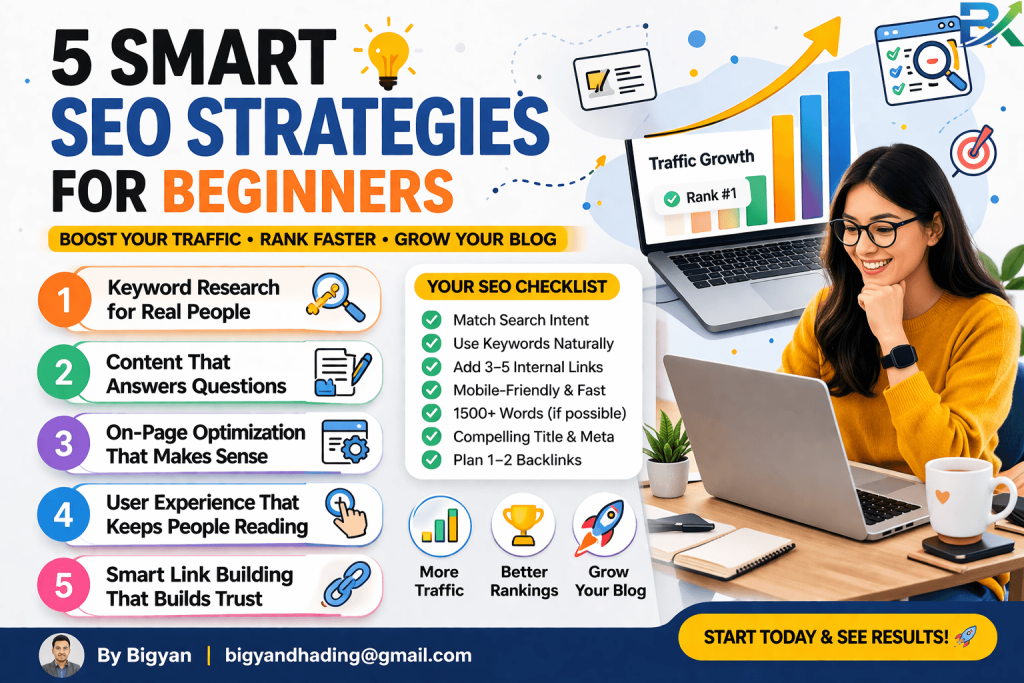
In this guide, I’m going to walk you through the five essential SEO strategies for beginners that actually moved the needle for me. These are smart, practical, and beginner-friendly — no technical degree required.
Let’s get into it.
👉 Learn how SEO helps your website grow here:
https://bigyankhadkacom.com/seo-for-beginners/
What Are SEO Strategies (And Why Beginners Get Them Wrong)?
Before we dive in, let’s get something straight.
SEO strategy isn’t about tricks. It’s not about gaming an algorithm or finding some secret loophole. Those things worked in 2012. They will get you penalized today.
Real SEO strategy is simpler than most people think. It’s about:
- Understanding what your reader is searching for
- Creating content that genuinely answers that question
- Making sure Google can find, read, and trust your page
- Doing this consistently over time
The reason most beginners fail isn’t a lack of effort. It’s a lack of direction.
I was writing the right way with the wrong plan. Once I fixed the plan, everything else started working.
I’ve personally tested these SEO strategies for beginners on multiple blog posts, and they consistently improved my rankings and traffic.
Here are the five that matter most.
Strategy 1: Stop Chasing Big Keywords — Target Long-Tail Instead
This was the single biggest shift in my results. And I wish someone had told me this on day one.
When I started blogging, I wanted to rank for terms like “SEO tips” or “how to start a blog.” Massive, high-volume phrases. Hundreds of thousands of searches a month.
The problem? Every major website on the internet was also targeting those terms. HubSpot, Backlinko, Neil Patel — these are billion-dollar content machines with thousands of backlinks. I had zero.
I had exactly zero chance of competing. And I didn’t realize it.
What Are Long-Tail Keywords?
Long-tail keywords are longer, more specific search phrases. Instead of “SEO tips,” think “SEO tips for beginners with no budget” or “how to rank a new blog post on Google in 90 days.”
They have lower search volume — but that’s the point. Long-tail keywords make up 91.8% of all Google searches, and in 2026, targeting them is the fastest path to organic rankings because short-tail terms are dominated by high-authority domains.
What this means for you: the specificity you think is a weakness is actually your superpower.
Why Long-Tail Keywords Work Better for Beginners
Three reasons I’ve seen this work firsthand:
1. Less competition. When you find long-tail keywords with low search volume, you often discover opportunities competitors ignore — a quick win for smaller websites.
2. Higher intent. Someone searching “waterproof hiking shoes for women under $100” is ready to act. Someone searching “shoes” is just browsing. More specific searches bring readers who are genuinely interested in exactly what you’ve written.
3. Faster ranking. A new blog can realistically hit page one for a specific long-tail phrase in weeks. For a short-tail phrase? Potentially never.
How to Find Long-Tail Keywords (For Free)
You don’t need expensive tools to start. Here’s what I use:
- Google Autocomplete — Type your topic into Google and watch what it suggests. Those suggestions are real searches people are making right now.
- People Also Ask — Scroll down on any Google results page and look at the “People Also Ask” box. Each question is a long-tail keyword in disguise.
- Google Search Console — If you’ve had your site running for a few weeks, this free tool shows you exactly what people are searching to find your existing pages. Hidden gems live here.
- Ubersuggest (free tier) — A beginner-friendly tool that shows search volume and competition for any keyword.
My rule: Target keywords where the Keyword Difficulty (KD) score is under 30. That’s the zone where a new blog can actually compete.
Strategy 2: Write Content That Matches Search Intent — Not Just Keywords
Here’s a mistake I made for months. I found a great keyword. I wrote a thorough article. I optimized the title. I did everything “right.”
And yet — the post wouldn’t rank.
It took me a long time to understand why. The answer was search intent. I was writing the wrong type of content for what the keyword was actually asking for.
What Is Search Intent?
Search intent is the reason behind a search query. What does the person actually want when they type those words?
There are four main types:
- Informational — “how does SEO work?” → They want to learn.
- Navigational — “Ahrefs login” → They want to find a specific page.
- Transactional — “buy SEO plugin for WordPress” → They want to purchase something.
- Commercial investigation — “best SEO tools for beginners” → They’re comparing options before deciding.
The fatal mistake? Writing an informational guide for a transactional keyword (or vice versa). Google can tell. And it will rank the content that matches intent, not just the content that contains keywords.
How to Check Intent Before You Write
Before writing a single word, Google your target keyword. Look at the top 5 results.
Ask yourself:
- Are these blog posts, product pages, or comparison articles?
- Are they short and direct or long and detailed?
- Do they answer a single question or cover a broad topic?
The format of the top results tells you exactly what Google thinks searchers want. Match that format.
In my experience, one of the most common beginner mistakes is writing a 2,500-word tutorial when Google is showing 500-word direct answers at the top. Shorter can absolutely win — if it matches what the searcher actually needs.
The Intent-First Writing Framework
Here’s what I do now before I write anything:
- Google the keyword first. Don’t assume. Verify.
- Note the content format — listicle, how-to, definition, comparison?
- Note the content depth — shallow overview or deep dive?
- Answer the question directly in the opening paragraph. Don’t make readers scroll for the answer.
- Then go deep with detail, examples, and added value.
This one shift — intent first, keywords second — improved my rankings more than any other single change.
Strategy 3: Build a Smart Internal Linking System
I ignored internal linking for my first year of blogging. It felt like a minor detail. Something to do after the “real” work was done.
That was a big mistake.
Internal linking is one of the most powerful — and most overlooked — SEO optimization techniques available to beginners. And the beautiful thing is: it costs nothing and you can do it in 10 minutes per post.
Why Internal Links Are Underrated Gold
When you link from one page on your site to another, two things happen:
For Google: You’re telling its crawlers where to go. New posts with no internal links pointing to them are essentially invisible. Google’s bots follow links. If nothing links to your new article, it takes much longer to get crawled and indexed.
For readers: You’re keeping them on your site longer. A reader who clicks to a second or third article stays engaged. Longer sessions signal to Google that your content is valuable.
There’s also a concept called link equity — sometimes called “link juice.” When a page has authority (earned through backlinks, age, and traffic), it can pass some of that strength to other pages it links to. Internal links are how you spread authority around your own site.
My Internal Linking System (Simple Version)
Here’s exactly what I do:
Step 1: When I publish a new post, I go back to 3–5 of my existing, established posts on related topics.
Step 2: I find a natural place in each article where my new post would genuinely add value for the reader.
Step 3: I add a contextual link using descriptive anchor text.
The anchor text matters enormously. Instead of writing “click here” or “read more,” I write something like “see my complete guide to on-page SEO for beginners.” That anchor text tells Google precisely what the destination page is about.
Step 4: In the new post itself, I include 3–5 links pointing to my other relevant content.
The result is a web of connected content that Google can crawl easily, and that keeps readers engaged longer.
One More Tip: Create a Pillar and Cluster Structure
If you plan to write multiple posts in the same topic area, build them as a cluster. Write one long, comprehensive “pillar” post that covers the broad topic, then write several shorter “cluster” posts on specific sub-topics — each linking back to the pillar and to each other.
Topic clusters replace traditional keyword strategies, and structured data is indispensable for visibility in rich results. This works because it signals to Google that you’re a genuine authority on a topic, not just someone who wrote one article about it.
Strategy 4: Optimize What You Already Have (The Refresh Strategy)
Here’s the strategy nobody talks about. And it’s the one that gave me the fastest results.
Most beginners focus 100% of their SEO energy on writing new content. Publish more. Write more. Create more.
But some of your biggest wins aren’t in the new posts you haven’t written yet. They’re hiding in the old posts you’ve already published.
Why Content Refresh Works
When you first publish a post, it’s brand new. Google doesn’t trust it yet. It’s not sure how it should rank, or whether anyone wants to read it.
But after a few months, something interesting happens. Some posts quietly start picking up rankings — maybe on page 3 or page 4. They’re not getting much traffic, but Google has indexed them and begun to understand them.
These posts are gold. They’ve already earned a degree of trust. With the right refresh, they can jump to page one.
One SEO team reported a 70.43% organic traffic boost after updating a single article — and often, a refresh delivers much higher ROI than creating something from scratch.
I’ve seen the same pattern. Several of my refreshed posts doubled or tripled their traffic within 6 weeks of being updated.
How to Find Your Refresh Opportunities
Open Google Search Console (free). Navigate to Performance → Search Results.
Look for posts that have:
- High impressions (Google is showing them) but low clicks (people aren’t clicking)
- Rankings between positions 8–20 (the second half of page one and top of page two)
These are your best candidates. They’re close. They just need a nudge.
The Content Refresh Checklist
When I refresh a post, I do all of the following:
Update the content:
- Replace any outdated statistics, tips, or references
- Add a new section covering recent developments (especially relevant in fast-moving fields)
- Strengthen the introduction — make it more compelling
- Add more examples and real-world context
- Expand thin sections; cut sections that don’t serve the reader
Update the on-page SEO:
- Review the title tag — is it still compelling? Can it be more specific?
- Rewrite the meta description if needed
- Check that the focus keyword still appears naturally in the first 100 words
- Add any new related keywords that are now relevant
Update the internal links:
- Add links to newer posts you’ve published since the original went live
- Check that all existing internal links still work
Update the publish date:
- Change the “last updated” date to today after all changes are made. Fresh content signals matter — especially for content that ages quickly.
The whole process takes 45–90 minutes per post. The results often take 3–6 weeks to fully show up. But when they do? It feels like magic.
Strategy 5: Earn Google’s Trust with E-E-A-T Signals
This one is less of a tactic and more of a philosophy. But it might be the most important strategy on this list for long-term results.
In 2026, Google doesn’t just rank keywords. It ranks trust.
It uses a framework called E-E-A-T: Experience, Expertise, Authoritativeness, and Trustworthiness. Understanding this is what separates bloggers who rank for years from those who spike and disappear.
What E-E-A-T Actually Means for Beginners
Let me make this practical. E-E-A-T is Google’s way of asking: “Can we trust this person to give accurate, helpful information?”
- Experience — Have you actually done what you’re writing about? First-hand experience now outranks theoretical knowledge.
- Expertise — Do you know the topic deeply? Are you citing real data, using specific examples, and going beyond surface-level tips?
- Authoritativeness — Do other credible sources link to or reference your work?
- Trustworthiness — Is your site secure (HTTPS)? Do you have an About page? Are your sources credible?
How I Built E-E-A-T Into My Content
Here’s what I actually changed in my writing:
Write from experience, not just research. Instead of generic tips, I share what I’ve personally tested. Lines like “In my experience…” and “What worked for me was…” are signals of genuine expertise — and readers trust them more, too.
Cite credible external sources. I link to primary sources like Google’s official SEO Starter Guide and authoritative resources like the Moz beginner SEO guide. This shows Google you’re connecting readers to trustworthy information, not just hoarding traffic.
Include an author bio. This one surprised me. Adding a genuine author bio with my name, background, and relevant experience helped my newer posts rank faster. It’s a trust signal that helps Google evaluate E-E-A-T at the page level.
Show your process, not just your conclusions. Anyone can say “use long-tail keywords.” But when you say “I used Google autocomplete to find 12 low-competition phrases and tested them across 4 posts over 8 weeks,” that’s experience talking. That’s what Google’s algorithms — and your readers — respond to.
Get HTTPS. This is non-negotiable. If your site still runs on HTTP, fix it today. It’s a trust signal Google explicitly looks for.
[Image: side-by-side comparison of a generic blog post vs an E-E-A-T optimized post with author bio and first-person insight]

Bonus: How to Use These 5 Strategies Together
Here’s the thing most SEO guides miss: these strategies don’t work in isolation. They compound.
Here’s the sequence that worked for me:
Week 1–2: Do keyword research. Find 10 long-tail keywords with KD under 30. Plan posts around them.
Week 3–6: Write and publish 2–3 new posts targeting those keywords. Match search intent carefully. Apply on-page SEO basics (title tags, meta descriptions, headings, internal links) to every post.
Week 6–10: Go back to your existing posts. Run them through the refresh checklist. Update 2–3 per week.
Ongoing: Build E-E-A-T into everything you write. Cite sources. Write from experience. Link to credible external resources. Keep your author bio updated.
Monthly: Check Google Search Console. Look for rising posts that need a refresh or a boost from new internal links.
This isn’t complicated. But it is consistent. And consistency is the thing that separates the blogs that grow from the ones that plateau.
https://www.semrush.com/blog/what-is-seo/
Common SEO Mistakes Beginners Make (That I Made Too)
Targeting keywords that are too competitive. I spent three months trying to rank for broad, high-volume keywords. Zero results. Switching to long-tail changed everything in weeks.
Ignoring search intent. Writing detailed guides for keywords that needed quick, direct answers. Google kept ranking my competitors instead because they matched what the searcher actually wanted.
Publishing and forgetting. I treated every post as finished the moment I hit publish. The refresh strategy taught me that the best traffic often comes 6–12 months after you update a post, not after you first publish it.
Writing for search engines, not people. Early on, my writing felt stiff and robotic because I was focused on keywords. The posts that ranked best — and kept people reading — were the ones where I wrote like a real person sharing real experience.
Skipping E-E-A-T basics. No About page. No author bio. Generic, unsourced content. These invisible trust signals matter more than most beginners realize.
How Long Before You See Results?
Real talk: SEO is not a sprint. But it’s also not as slow as some people make it sound.
Here’s what a realistic timeline looks like when you apply these five strategies:
| Timeframe | What to Expect |
|---|---|
| Week 1–4 | New content gets indexed. Very little traffic, but Google is watching. |
| Month 1–2 | Long-tail posts start showing up on pages 3–5. Early signs of life. |
| Month 2–3 | Refreshed posts start to move. Long-tail posts edge toward page 1. |
| Month 3–6 | Consistent growth. Multiple posts on page 1. Compounding traffic begins. |
| Month 6–12 | Internal linking and E-E-A-T signals compound. Traffic grows month over month. |
The bloggers who give up at Month 2 never see Month 6. Don’t be one of them.
Quick-Start Action Plan for This Week
You don’t need to do everything at once. Here’s what to focus on first:
Today:
- Open Google and find 5 long-tail keyword ideas using autocomplete and People Also Ask
- Filter for specific phrases with 3+ words and lower competition
This week:
- Write one new post targeting a long-tail keyword with clear search intent
- Go back to 3 older posts and add internal links pointing to each other
This month:
- Open Google Search Console and find one post with high impressions but low clicks
- Run it through the content refresh checklist above
This quarter:
- Audit your site for E-E-A-T signals — add an About page, author bio, and HTTPS if you haven’t
- Build your first pillar-and-cluster content structure around your main topic
❓ What are the best smart SEO strategies for beginners in 2026?
The best smart SEO strategies for beginners are usually the simplest ones done consistently. From my experience, focusing on long-tail keywords, search intent, internal linking, helpful content, and page speed improvements gives the fastest results for new websites.
A lot of beginners try advanced tricks too early. But honestly, basic SEO done properly still works incredibly well in 2026.
❓ How long does SEO take to increase traffic?
SEO is not instant, and that frustrated me a lot when I first started.
Usually:
- Small improvements → 2–4 weeks
- Ranking movement → 2–3 months
- Strong traffic growth → 6+ months
The good news is that smart SEO strategies for beginners keep compounding over time. One optimized article today can still bring traffic months or even years later.
❓ Can beginners really rank on Google without backlinks?
Yes — especially with low-competition long-tail keywords.
I’ve personally ranked beginner blog posts without any backlinks just by using better SEO optimization techniques, improving search intent, and writing genuinely helpful content.
For competitive keywords, backlinks eventually help. But beginners can absolutely start getting traffic before that.
❓ What is the biggest SEO mistake beginners make?
The biggest mistake is trying to rank for huge competitive keywords too early.
I made this mistake myself. I targeted broad keywords like “SEO tips” and got nowhere.
Everything changed when I started using smart SEO strategies for beginners focused on specific long-tail phrases with lower competition and clearer search intent.
❓ Which SEO strategy gives the fastest results for beginners?
In my experience, these usually work fastest:
- Long-tail keyword targeting
- Updating old blog posts
- Improving title tags and meta descriptions
- Better internal linking
- Faster page speed
Sometimes a simple title update alone can improve click-through rate surprisingly fast.
❓ Do I need expensive SEO tools as a beginner?
No. Most beginners can start with free tools.
Here’s what I used in the beginning:
- Google Search Console
- Google Trends
- Google Autocomplete
- PageSpeed Insights
- Ubersuggest free version
The strategy matters more than expensive software.
❓ Are smart SEO strategies for beginners still worth learning in 2026?
Absolutely.
SEO keeps changing, but the fundamentals still matter:
helpful content, good user experience, search intent, and trust.
That’s why smart SEO strategies for beginners are still one of the best long-term ways to grow free organic traffic consistently without relying completely on ads or social media algorithms.
Final Thoughts: Simple Beats Complicated, Every Time
Here’s the honest truth. I wasted a year doing SEO wrong because I was overwhelmed by complexity.
I read articles about technical site audits and canonical tags and structured data markup. All of that stuff matters eventually. But none of it helps you if you haven’t nailed the fundamentals first.
These five strategies — long-tail keywords, search intent matching, smart internal linking, content refreshing, and E-E-A-T signals — are the fundamentals. They’re not the only things that matter, but they’re the ones that deliver results while you’re still figuring everything else out.
You don’t need to be an expert. You don’t need expensive tools. You just need to be consistent, be curious, and be honest in your writing.
The traffic comes when you stop chasing it and start genuinely serving the person on the other side of the search bar.
I’m still learning. Every month I find something new that improves my results. But the five strategies in this guide? They’ve been the constant. They work. They keep working.
Now go implement one of them. Not tomorrow. Today.
Found this helpful? Share it with a fellow blogger who’s still stuck in the “publish and pray” stage. And if you have questions, leave them in the comments — I reply to every one.
More from this series:
Resources mentioned:
- Google’s official SEO Starter Guide
- Moz beginner SEO guide
- Google Search Console
- Google PageSpeed Insights
- Ubersuggest (free keyword tool)