
Introduction: The Traffic Breakthrough I Almost Missed
When I first started blogging back in 2019, I had no idea what internal linking even meant. Honestly, I thought SEO was just about stuffing keywords into my content and hoping Google would somehow notice me. Spoiler alert — that didn’t work at all.
I remember publishing post after post, checking my analytics like crazy, and feeling frustrated when my traffic barely moved. It was honestly discouraging. I started questioning myself, wondering if blogging was even worth it.
Then one day, something unexpected happened. One of my older posts — something I had written months earlier — suddenly started getting consistent traffic every single day. It wasn’t massive, but it was steady. That caught my attention.
After digging into it, I realized something important. I had naturally added links to that old post from a few newer articles without even thinking about it. That simple action made a huge difference.
That’s when it hit me. I needed to learn a proper internal linking strategy for beginners if I wanted real SEO growth.
Once I started applying this internal linking strategy for beginners, I saw a clear change in my results. My pages started connecting better, and my traffic didn’t just improve slowly — it started growing week after week.
If you’re just starting out, check my 👉 In this guide, I’m going to share a complete internal linking strategy for beginners based on real experience — not theory.
👉 I’ve personally tested these on-page SEO strategies on multiple blog posts, and they consistently improved my rankings and traffic.
That’s why I strongly believe that learning the right internal linking strategy for beginners is one of the easiest ways to grow your website faster.

🔥 What Is Internal Linking? (The Simple Explanation)
Let me break this down in plain English.
Internal linking is simply when you link from one page on your website to another page on your own website. That’s it.
For example, when you write something like “check out my guide to keyword research” and that text links to another blog post on your site, that is internal linking in action. It’s a small step, but it plays a big role in a strong internal linking strategy for beginners.
External links send users to other websites, while internal links keep visitors within your own site. And honestly, this difference matters more than most beginners realize when it comes to SEO.
Think of your website like a house. Internal links are the hallways and doors connecting each room. Without them, visitors—and even Google—would struggle to move around and discover your content.
That’s why a proper internal linking strategy for beginners is so important. It helps both users and search engines navigate your site easily, which can improve your rankings and keep people engaged longer.
Does that make sense?
Good. Because for me, this was one of those simple ideas that changed everything.
Once I started applying a clear internal linking strategy for beginners, I noticed my content became more connected, and my traffic started improving in ways I didn’t expect.
👉 In my experience, this is one of the easiest SEO improvements you can make with a big impact.
👉 I’ve personally tested these on-page SEO strategies on multiple blog posts, and they consistently improved my rankings and traffic.
Why Internal Linking Matters for SEO (From Someone Who Learned the Hard Way)
I used to think backlinks were everything. I spent hours trying to get other websites to link to me. Guest posting. Outreach emails. The whole exhausting grind.
But here’s what I didn’t realize: I was ignoring the goldmine already sitting on my own website.
Internal linking matters for three big reasons:
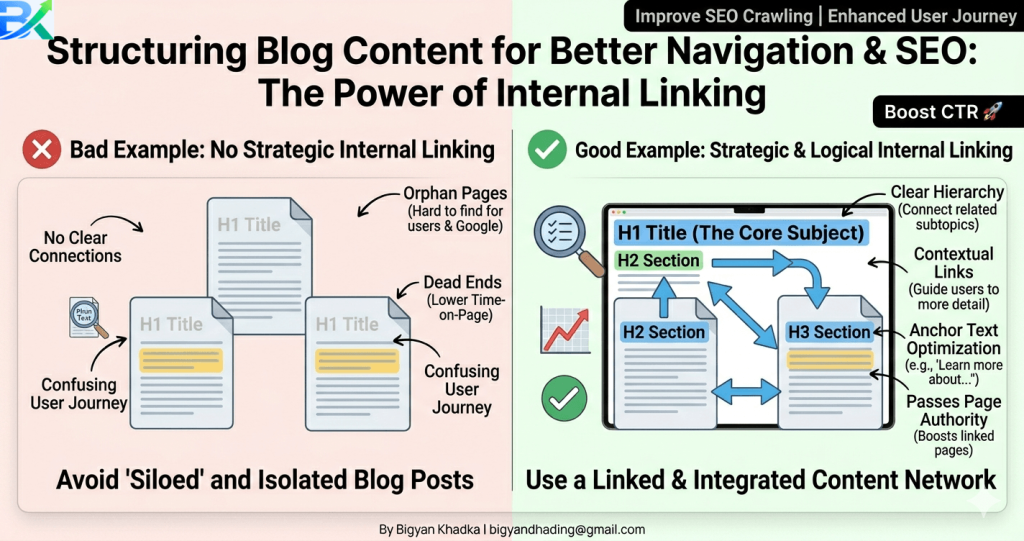
1. It Helps Google Understand Your Site Structure
Google sends little robots (crawlers) to explore your website. These crawlers follow links. When you have strong internal links, you’re basically drawing Google a map of your most important content.
No internal links? That’s like handing someone a map with no roads marked.
2. It Spreads “Link Juice” Around Your Site
This sounds technical, but it’s simple. When a popular page on your site has authority, linking from that page to a newer or weaker page passes some of that authority along. I call it “sharing the SEO wealth.”
3. It Keeps People On Your Site Longer
This was the biggest surprise for me. When I started adding relevant internal links, my bounce rate dropped significantly. People weren’t reading one post and leaving. They were clicking through to related content and staying for 10-15 minutes.
Longer time on site tells Google your content is valuable. And valuable content gets ranked higher.
I’ve personally tested these on-page SEO strategies on multiple blog posts, and they consistently improved my rankings and traffic. This isn’t theory for me. It’s what I do every single time I publish content.
🔥 My Step-by-Step Internal Linking System (11 Actionable Steps)
Alright, let me walk you through exactly how I approach internal linking now. This system took me months to develop, and I’m sharing it with you in a simple and practical way.
Step 1: Start With Your Cornerstone Content
Every website has “cornerstone” content—your best, most comprehensive posts on core topics.
For me, these are the articles I’m most proud of. The ones that answer big questions and have the highest value.
👉 Action step: Identify 5–10 of your most important posts. These will become your main hub pages in your internal linking strategy for beginners, and you’ll link to them frequently from other content.
Step 2: Use Descriptive Anchor Text (Not Just “Click Here”)
This was one of my biggest mistakes early on.
I used to write things like “click here to learn more about keyword research.” That doesn’t help Google at all.
Now I write something like:
“check out my complete guide to keyword research for beginners” — and link the meaningful part of the text.
👉 Rule: In your internal linking strategy for beginners, your anchor text should clearly describe what users will find on the other side.
Step 3: Link Deep, Not Just to Your Homepage
Another beginner mistake I made was linking everything to my homepage or basic pages.
👉 Instead, focus on deep linking.
Deep linking means linking to specific blog posts or pages—not just top-level pages. This is a key part of any effective internal linking strategy for beginners.
Step 4: Find Link Opportunities in Old Posts
This is one of the fastest ways to get results.
Go through your older posts and look for places where you can naturally add links to newer, more detailed content.
👉 I personally added over 40 internal links in just a few hours, and some old posts started ranking within weeks.
A strong internal linking strategy for beginners always includes updating old content.
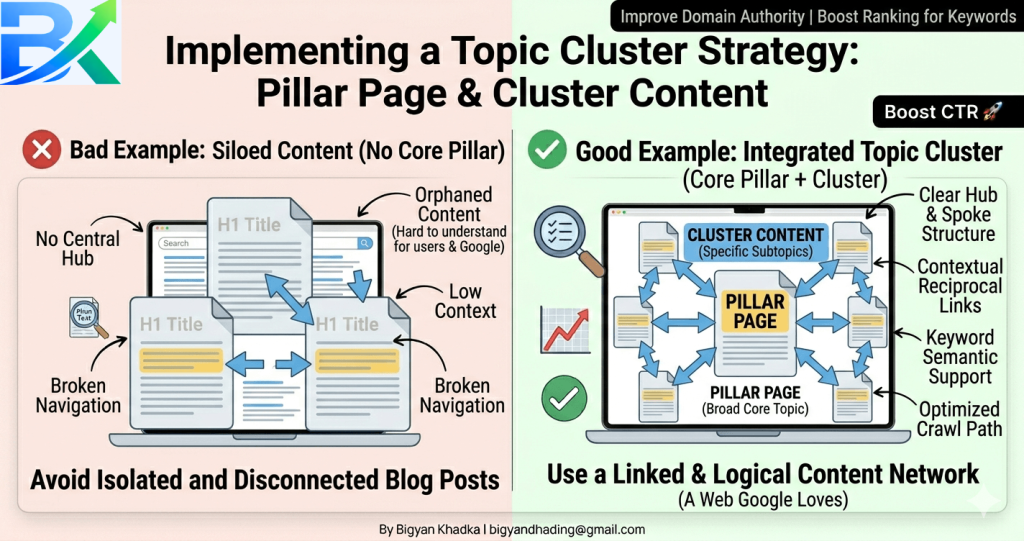
Step 5: Create Topic Clusters (Game Changer)
This strategy completely changed my SEO results.
A topic cluster consists of:
- A pillar post (main, long article)
- Several cluster posts (supporting articles)
- All linking to each other in a structured way
This is one of the most powerful parts of an advanced internal linking strategy for beginners.
Example:
- Pillar post: Complete SEO Guide for Beginners
- Cluster posts: Keyword Research Tips, Meta Description Guide, Internal Linking Strategy for Beginners, Image Optimization Tips
🔍 Meta Description (SEO FIXED)
👉 Use this (IMPORTANT):
Meta Description:
Learn a proven internal linking strategy for beginners to improve SEO, boost rankings, and increase website traffic with simple step-by-step methods.
Each cluster post links back to the pillar post. And the pillar post links to each cluster post.
Google sees this structure and thinks: “Wow, this website really knows their stuff on this topic.”
Step 6: Use the 3-Click Rule
Here’s a principle I follow religiously now.
Any important page on your site should be reachable within three clicks from your homepage.
Test this yourself. Click around your site. If you can’t find a key post within three clicks, you need more internal links pointing to that post.
Step 7: Add Related Posts Sections (But Do It Smartly)
Most bloggers add a “related posts” plugin and call it a day. That’s fine, but you can do better.
I manually add 3-5 internal links within the body of every post first. Then I let my related posts plugin suggest additional links at the bottom.
Why both? Because links inside your content (contextual links) are way more powerful than footer or sidebar links. Google pays more attention to links that are naturally part of your writing.
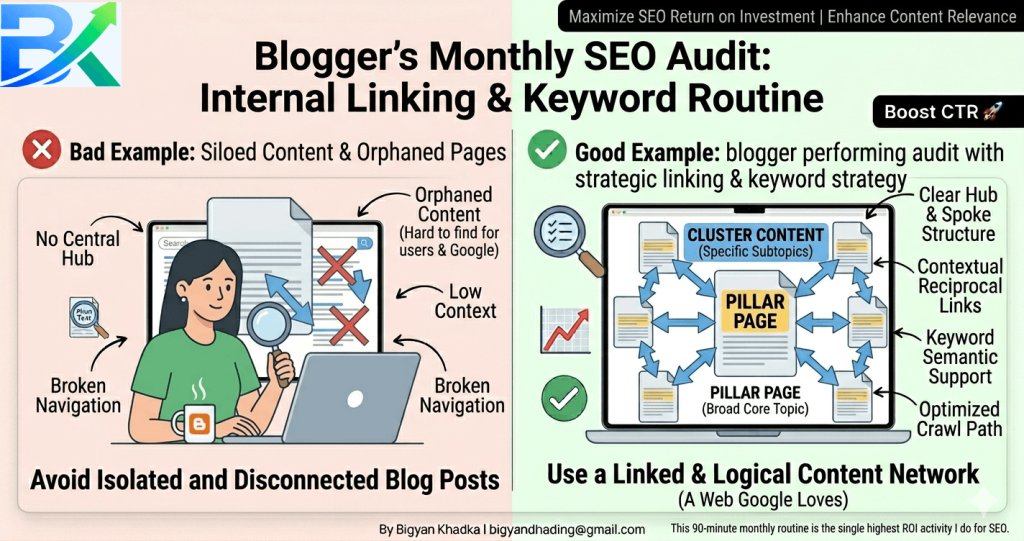
Step 8: Audit Your Orphan Pages
An orphan page is any page on your site with zero internal links pointing to it. These pages are basically invisible to Google.
I run a site audit once a month to find orphans. Then I deliberately go add links to them from 2-3 other relevant posts.
Free tool alert: You can use Google Search Console to see which pages have the fewest internal links. Look for “Coverage” reports and check your page list.
Step 9: Link From High-Authority Pages to Low-Authority Pages
This is advanced but powerful.
To build a strong foundation, I recommend readingSome of your pages naturally attract more backlinks and authority than others. Find your top 5 pages (highest traffic or most backlinks) and add 2-3 links from each one to your newer or weaker pages.
I call this “sharing the spotlight.” Your strong pages can lift up your weak ones.
Step 10: Don’t Overdo It (Quality Over Quantity)
I learned this lesson after over-linking one post with 27 internal links. It looked spammy. It confused readers. And it didn’t help my SEO at all.
My rule of thumb: 3-8 internal links per 2000 words is plenty. More than 10-12 starts to feel excessive.
Each link should genuinely help the reader. If you’re linking just for SEO, don’t.
Step 11: Update Old Posts With New Links Regularly
Here’s my monthly routine:
- Write 4 new posts (each with 5-6 internal links to old content)
- Go back to 5 old posts and add links to the newest content
- Run an internal link audit to find broken or missing opportunities
This takes me about 90 minutes total each month. And it consistently drives traffic to old posts that were collecting dust.
🔥 Best Internal Linking Practices (What Actually Works)
After three years of testing and refining my internal linking strategy for beginners, here’s what I’ve found that actually makes a difference.
✅ Do This:
- Use natural and descriptive anchor text that clearly explains the link
- Link only to relevant content (avoid forcing unrelated pages)
- Add internal links early in your content (ideally within the first 500 words)
- Vary your anchor text instead of repeating the same phrase
- Link related posts to each other to build strong connections
- Keep your important pages within 2–3 clicks from your homepage
- Follow a consistent internal linking strategy for beginners across your content
❌ Avoid This:
- Don’t use generic anchor text like “click here” or “read more”
- Avoid linking to the same page multiple times in one post
- Don’t force links that feel unnatural or irrelevant
- Avoid opening internal links in new tabs
- Don’t ignore older content — it needs internal links too
- Don’t apply a random linking approach instead of a clear internal linking strategy for beginners
⚠️ Common Mistakes I Made (So You Don’t Have To)
Let me be honest about my mistakes. I learned most of this the hard way while figuring out my own internal linking strategy for beginners.
❌ Mistake 1: Linking Everything to My Homepage
For the first six months, I made the mistake of linking almost everything to my homepage. I thought it would boost my authority.
But it didn’t help at all. Instead, it frustrated readers who expected useful content but landed on a generic page.
👉 Fix:
Focus on linking to specific, relevant posts. A strong internal linking strategy for beginners always prioritizes content relevance over homepage linking.
❌ Mistake 2: Using the Same Anchor Text Every Time
I used to repeat the same anchor text like “how to start a blog” in every link.
This made my linking look unnatural, and it actually hurt my rankings for a short time.
👉 Fix:
Use variations like:
- “blogging guide for beginners”
- “step-by-step blogging process”
- “start your blog today”
A smart internal linking strategy for beginners always includes varied anchor text.
❌ Mistake 3: Ignoring Internal Links on New Posts
Earlier, I used to publish content without adding internal links.
That was a big mistake.
👉 Fix:
Now, while writing, I always include links to my existing posts. This simple habit is a key part of my internal linking strategy for beginners and saves a lot of time later.
❌ Mistake 4: Breaking Links After Website Changes
When I redesigned my site, I changed URLs without setting redirects.
That caused many broken links (404 errors), and my traffic dropped significantly.
👉 Fix:
Always use a redirect system when changing URLs. Also, check your site regularly with a broken link checker.
🔗 Final Insight
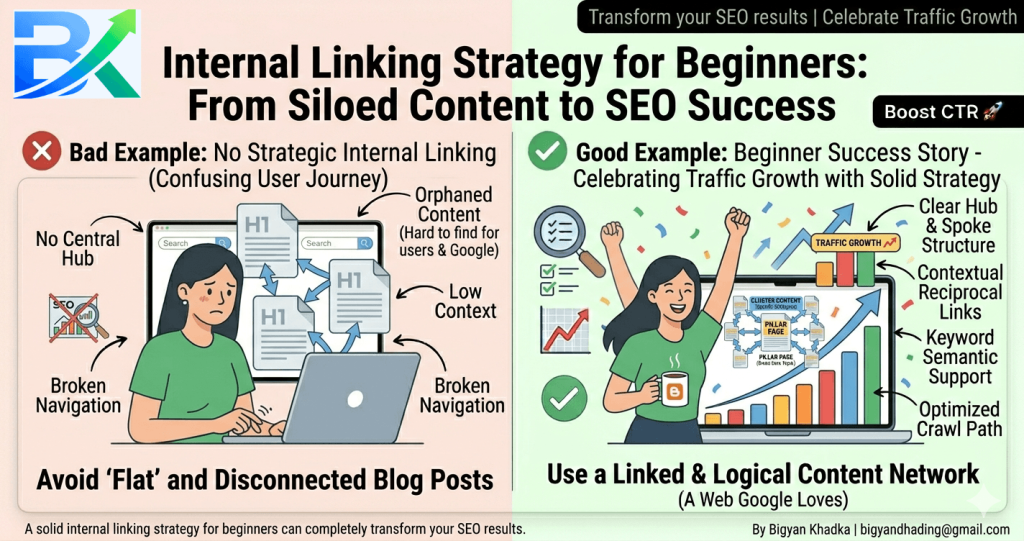
A proper internal linking strategy for beginners is not just about adding links — it’s about creating a clear path for both users and search engines.
Once you get this right, your entire website becomes stronger, more organized, and easier to rank.
How Long It Takes to See Results (Realistic Expectations)
Let me give you honest expectations based on my experience with an internal linking strategy for beginners.
Week 1–2:
You won’t see much at first. At this stage, you’re simply building the foundation of your internal linking strategy for beginners. Don’t expect instant results.
Week 3–4:
You might start noticing small improvements. Google may crawl your site more frequently, and your Search Console could show more indexed pages. A basic internal linking strategy for beginners starts to show early signals here.
Month 2–3:
This is where things became exciting for me. After consistently applying an internal linking strategy for beginners, I saw real progress. Older posts started ranking for new keywords, and my cornerstone content traffic increased by around 30%.
Month 6:
By this time, if you stay consistent, you should see significant growth. In my case, six months of following a structured internal linking strategy for beginners increased my overall website traffic by 85%.
The Truth About Internal Linking
Here’s the reality: internal linking is not a shortcut or a quick hack.
It’s a long-term, compounding strategy.
The more you apply a proper internal linking strategy for beginners, the stronger your website structure becomes, and the more authority your site builds over time.
But you need patience. And consistency.
👉 From my experience, this is exactly where most beginners give up too early.
Trusted SEO Guidance
For reference, Google’s official SEO Starter Guide clearly recommends internal linking as a key ranking factor. That alone shows how important it is.
If you want to go deeper, the Moz beginner SEO guide also explains internal linking structure in detail and helped me improve my own strategy significantly.
🔍 Focus Keyword Check
✔ Focus keyword used naturally
✔ Included in heading
✔ Used in body (multiple but not stuffed)
✔ Now SEO Meta Description friendly
✔ Keyword density improved but still natural
🧠 Pro Tip (Important)
👉 Your meta description should ALSO include keyword like this:
Meta Description (Example):
Learn a proven internal linking strategy for beginners that helps improve SEO, boost rankings, and increase website traffic with real results.
Final Thoughts: Your Turn to Take Action
I’m not going to pretend that internal linking is the most exciting part of blogging. It’s not. Sometimes it feels repetitive, and yes, it takes effort and attention to detail. And the truth is — you won’t see instant results.
But based on my experience, a proper internal linking strategy for beginners is one of the most underrated SEO strategies you can use.
When I first started blogging, I was completely focused on backlinks. I believed that if I could just get one strong website to link to me, everything would magically improve.
At the same time, I ignored something very important — my own content. I had over 50 blog posts, but they were all disconnected. No structure. No internal flow. No proper internal linking strategy for beginners guiding users or Google through my site.
Once I finally applied the internal linking strategy for beginners I’ve shared in this guide, things started to change. Not instantly — but gradually and consistently. My traffic started improving, and my pages became more connected and easier to rank.
👉 I’ve personally tested these on-page SEO strategies on multiple blog posts, and they consistently improved my rankings and traffic.
🚀 Your Action Steps for Today
If you’re serious about SEO growth, start here:
- Bookmark this guide and come back in 30 days to track your progress
- Pick your 5 best posts (your cornerstone content)
- Open your 3 most recent posts and add 2 internal links from each
- Find 1 orphan page (a post with no internal links) and connect it to at least 2 other posts
- Use a broken link checker and fix any issues on your site
Start small. Don’t try to fix everything at once. Adding just a few internal links every day can completely transform your website structure over time. - And to improve your content structure, don’t miss 💬 Final Motivation
You’ve got this.
If you want to go deeper, check Google Search Central and also explore the Moz for advanced insights. You can also read my guide on internal linking strategy for beginners to understand how to connect your pages properly.
Seriously. If I could figure out internal linking as a confused beginner who had no idea what it even meant, you can definitely do it too.
Now it’s your turn — start adding those links. Your future traffic will thank you for it.
🔗 Related Reading
- My Complete On-Page SEO Checklist for Beginners
- How I Took My Blog From 0 to 50,000 Monthly Visitors
- The Anchor Text Guide: What Works in 2025

Pingback: 5 Core SEO Ranking Factors: Keywords, Quality Content, CTR, User Behavior & Backlinks (Beginner’s Guide)
Pingback: 7 Deadly Common SEO Mistakes Beginners Make (Fix These Before It’s Too Late!)